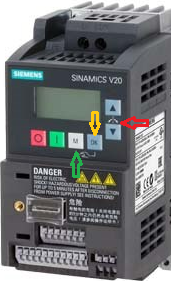
How to set the parameter on the invertor 101U1/102U1/104U1
CAUTION: do not perform any changes if you are not familiar with this procedure
At first, make sure you have a correct values for your machine and all motors are Off
Please be aware that each machine comes with electrical drawings provided in the documentation, typically stored on a USB flash drive. You can find a table with parameters on the page that belongs to the respective controlelr
To access configuration mode:- Press M (marked with the green arrow)
- Press Up or Down to choose the parameter (marked with the red arrow) Follow the sequence specified in the table
- Press OK one or two times to see the value (marked with the yellow arrow) and check the value.
- If the value is correct - press M one or two timee to return the parameter list
- Write down original value in your notes before changing
- Press Up or Down to change the value
- Press OK one or two times to set the new value and return to the parameter list
- Check parameters one by one till the end of the table.
- Press M for 2-3 seconds to go out of the configuration mode
Important: return the parameter P0003 and P0010 to the correct values otherwise the motor will stay in configuration mode